
SAP Data Migration: Best Practices, Strategy & Tools Guide (2026)
SAP data migration is the structured process of moving master data, transactional data, and configuration data from a legacy system, typically SAP ECC or a non-SAP platform into a target SAP environment such as S/4HANA, while preserving accuracy, completeness and traceability.
With SAP ending mainstream maintenance for Business Suite 7 (including ECC 6.0) at the close of 2027, data migration has shifted from an optional IT upgrade to a board-level deadline.
Industry research consistently points to the same root cause of failed SAP projects: it’s rarely infrastructure, licensing, or technology selection. It’s the data. The most effective data migration techniques in SAP combine technical rigor with business governance and the projects that skip one in favour of the other are the ones that derail at cutover.
This guide breaks down what data migration in SAP actually involves, the strategic decisions you need to make before a single record moves, a phase-by-phase SAP data migration best-practices framework, the sap data migration tools and the mistakes that derail otherwise well-funded projects.
According to SPV Consulting’s approach, drawn from SNP-certified migration engagements, the projects that succeed treat SAP data migration as a business transformation discipline, not a technical task handed off in the final weeks of a project.
What Is SAP Data Migration?
SAP data migration refers to the extraction, transformation, validation, and loading of business data from one system into an SAP landscape. Three terms are often confused when discussing data migration in SAP, but they mean different things:
- Data migration moves data between two different systems or platforms (for example, ECC to S/4HANA, or a legacy non-SAP ERP into SAP).
- Data conversion changes the format or structure of data without necessarily changing systems (for example, restructuring material master records to fit a new data model).
- Data integration connects two live systems so they exchange data on an ongoing basis, rather than a one-time transfer.
A SAP data migration project typically touches four data categories: master data (customers, vendors, materials, GL accounts), transactional data (open orders, invoices, work-in-progress), configuration data (org structures, pricing conditions), and historical data (closed records retained for audit or reporting).

What Triggers an SAP Data Migration? Six Common Scenarios
Understanding why a data migration in SAP is happening shapes every decision that follows – from tool selection to archiving policy to stakeholder involvement. Each scenario demands different data migration techniques in SAP, different scoping decisions, and different risk mitigation approaches. The six most common triggers are:
1.
ECC to S/4HANA upgrade
The most common driver for SAP data migration in 2026 is accelerated by SAP’s 2027 end of mainstream maintenance for SAP Business Suite 7 / ECC 6.0.
2.
Non-SAP to SAP greenfield implementation
Organizations moving off legacy Oracle, IBM, or homegrown ERP systems into SAP for the first time. This is the most complex scenario because there is no existing SAP structure to convert – everything is built from scratch.
3.
M&A consolidation
Post-merger integration frequently requires combining multiple SAP instances or migrating an acquired company’s data into the parent organization’s SAP landscape – including harmonizing charts of accounts, vendor masters, and cost center hierarchies across previously separate entities.
4.
Business division spin-off or divestiture
The reverse of M&A: carving out a subset of data from a larger SAP environment and migrating it into a new standalone instance without orphaning dependent records or violating data residency obligations.
5.
Cloud migration
Moving SAP data from on-premise infrastructure into SAP S/4HANA Cloud (Public or Private Edition), or adopting RISE with SAP or GROW with SAP. This often involves a database migration to SAP HANA as a first step, since S/4HANA runs exclusively on SAP HANA rather than the multiple database options available in ECC.
6.
Compliance, standardization or data quality improvement
Organizations that have let master data quality degrade over years of organic growth and acquisitions sometimes initiate a migration-style remediation project to harmonize and clean data without necessarily changing the core system version.
What Are the Types of SAP Data Migration?
Beyond the why, organizations need to understand the what – the type of data migration in SAP shapes the complexity, tooling, and risk profile of the project. Each type also calls for a different set of data migration techniques in SAP at the execution level.
Storage migration
It moves data from legacy or fragmented on-premise storage systems to a unified, modern storage infrastructure. The goal is typically to consolidate data silos, reduce the cost of maintaining multiple storage environments, and improve retrieval performance.
Database migration
It moves data to a new database system. In the SAP context, this is especially relevant for organizations upgrading to S/4HANA: since S/4HANA only runs on SAP HANA (not Oracle, DB2, or SQL Server as ECC could), a database migration to SAP HANA is a prerequisite for the application migration, and some organizations complete this database layer migration first as a lower-risk intermediate step before tackling the full S/4HANA application upgrade.
Application data migration in SAP
It is the full move from one application or ERP system to another – for example, from SAP ECC to S/4HANA, or from a non-SAP system into SAP. This is the most data-intensive type because every application has its own data model, schema, and business rules that must be mapped to the target system’s structure.
Cloud migration
It shifts workloads and data from on-premise SAP environments to cloud-based SAP platforms. This may be done for scalability, infrastructure cost reduction, or to access SAP BTP (Business Technology Platform) capabilities.
Business process migration
This migration occurs during major reorganizations – mergers, acquisitions, or divestitures – where customer, product, and operational data must be moved alongside the restructuring of the business processes that govern it.
Hybrid migration
It combines on-premise and cloud elements, moving some data and processes to the cloud while retaining others on-premise. This is common for organizations with complex regulatory or data residency requirements that prevent a full cloud migration.
Why Is SAP Data Migration So Urgent in 2026?
Three converging forces make 2026 the year organizations with unresolved ECC environments need a defined data migration in SAP roadmap:
1.
The ECC maintenance deadline
Mainstream maintenance for SAP Business Suite 7 core applications, including SAP ERP 6.0 / ECC, ends December 31, 2027. Optional extended maintenance is available through 2030 at additional cost, but after 2027, organizations will no longer receive critical security patches or regulatory updates as standard support. The longer organizations wait, the narrower the runway and the higher the cost of emergency extensions.
2.
AI and analytics readiness
S/4HANA’s embedded AI capabilities, real-time analytics, and the use cases built on SAP Business Technology Platform all depend on clean, well-governed data. Migrating poor-quality legacy data into a modern platform simply relocates the problem – and actively limits the ROI of every AI initiative, analytics investment, or automation program built on top of the new environment.
3.
The business case for cost reduction and process standardization
Maintaining legacy ECC infrastructure is expensive: it requires manual workarounds, costly integrations to bolt-on systems, and dedicated support for aging customizations. Migration provides the opportunity to decommission those systems, standardize processes across regions and business units, and reduce the ongoing cost of the IT landscape.
4.
Getting executive buy-in early is not optional
Organizations that treat data migration in SAP as a purely technical project and delay engaging CFOs, business unit heads, and process owners until problems surface, consistently face the costliest overruns. Executive sponsorship determines which data decisions get made quickly (chart of accounts harmonization, archiving policy, vendor deduplication rules) versus which ones stall the entire project.
According to SPV Consulting’s approach, executive alignment on scope and data quality standards in the planning phase is the single biggest predictor of whether a migration stays on schedule.
Greenfield, Brownfield, or Selective Data Transition: Which SAP Migration Strategy Is Right for You?
Before technical work begins on any data migration in SAP project, leadership must settle on a migration approach. This decision drives timeline, budget, risk profile, and how much of the existing system’s customization survives the move.
The choice of approach also defines which data migration techniques in SAP are practical – a greenfield build opens up the full range of load tools and object templates, while a brownfield conversion constrains some of those choices by the existing data structures being carried forward.
Greenfield Migration
A greenfield migration is a full reimplementation in a new S/4HANA environment, built from scratch rather than carried over from the old system. Greenfield gives organizations the opportunity to redesign processes around SAP best practices, eliminate accumulated technical debt, and leave behind years of one-off customizations.
The trade-off is a longer timeline – data mapping, validation, and process redesign all start from zero. Greenfield SAP data migration suits organizations with heavily customized or outdated ECC environments where the existing configuration is more liability than asset, and for companies migrating from non-SAP systems where there is no existing SAP structure to convert.
Brownfield Migration (System Conversion)
A brownfield migration, also called a system conversion upgrades the existing SAP system technically while retaining most of its structures, processes, and historical data. Brownfield is faster, less disruptive, and lower-cost than greenfield because there’s no need to rebuild configuration from scratch.
The risk: brownfield inherits whatever data quality problems already exist in the source system, along with inefficient customizations built up over years. It’s the right fit for organizations with critical, well-functioning customizations they cannot afford to lose, and where the ECC environment is relatively clean and well-governed.
Selective Data Transition (SDT)
Selective Data Transition is one of the more sophisticated data migration techniques in SAP – a hybrid approach that allows organizations to modernize their data landscape and adopt S/4HANA capabilities while selectively retaining the customizations and historical records that matter, and intentionally leaving behind what doesn’t.
SDT reduces operational disruption while capturing some of the redesign benefits of a greenfield build. It is a strong middle path for companies that can’t justify a full rebuild but also can’t carry forward every legacy inefficiency.
SAP HANA / Database-First Migration
Some organizations choose a database-layer-first migration: moving the underlying database from Oracle, DB2, or SQL Server to SAP HANA before tackling the full S/4HANA application upgrade.
Database-first data migration techniques in SAP separate the database migration project from the business process transformation work, reducing the risk of attempting both changes simultaneously and delivering immediate performance improvements from the in-memory architecture.
Approach
Speed
Risk Level
Best For
Greenfield
Slowest
High upfront, low long-term debt
Outdated/over-customized ECC; non-SAP to SAP
Brownfield
Fastest
Inherits existing data quality issues
Stable systems, critical customizations to preserve
Selective Data Transition
Moderate
Balanced
Modernization without full rebuild
Database-First (HANA)
Varies
Lower (phased risk)
Organizations wanting a staged approach
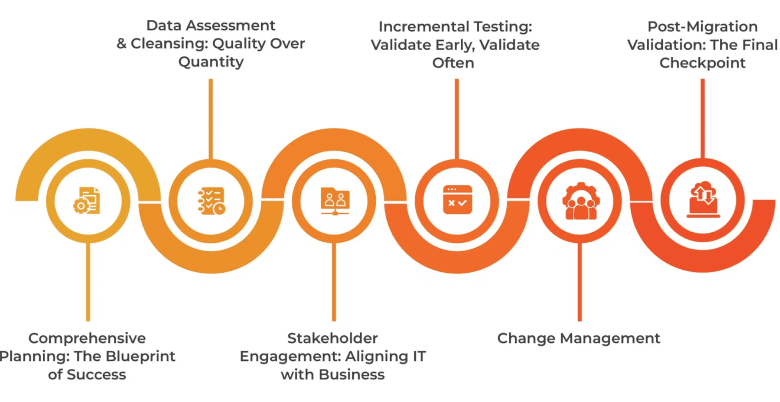
What Are the Best Practices for SAP Data Migration? A Phase-by-Phase Framework
Phase 1: Define Objectives and Get Executive Alignment
Every data migration in SAP plan should start by answering why the project exists: ECC compliance deadline, performance improvement, M&A integration, cost reduction, or AI enablement. The objective determines which data is in scope, how aggressively you archive historical records, which business units are affected, and how success will be measured at go-live. This is also where executive stakeholders – CFO, business unit heads, compliance officers – need to be formally aligned, not just informed. Decisions about chart of accounts harmonization, vendor master deduplication rules, and historical data retention cannot be made by the technical team alone.
Skipping this step is the single most common reason migrations balloon in scope mid-project.
Phase 2: Run a Comprehensive Data Assessment and Profiling
Profile source data for accuracy, duplication, completeness, and relevance before any data migration in SAP moves forward. Data profiling tools surface inconsistencies early – duplicate vendor records, missing mandatory fields on material masters, inconsistent unit-of-measure assignments – when they’re cheap to fix, rather than after they’ve caused a duplicate payment or a failed cutover load.
This stage also governs the minimum data principle: migrate only what the business needs to run. Loading historical data in full inflates cost, extends timelines, and introduces unnecessary complexity. Every data category should have a defined retention decision – migrate, archive, or decommission – made during this phase, not improvised at cutover.
Phase 3: Build the Data Map and Transformation Rules
The data map is the backbone of any SAP data migration – it documents precisely how each legacy data element maps to its SAP target field, including the transformation logic required: currency conversions, date format standardization, unit-of-measure harmonization, and chart-of-accounts mapping.
This phase includes both field mapping (aligning individual source fields to their target equivalents) and structure mapping (aligning hierarchical data structures and complex table relationships). The transformation rules defined here govern which data migration techniques in SAP are used for each object and each load mechanism.
Cross-field validation deserves particular attention: SAP’s standard migration tools do not include built-in cross-field checks. An order quantity field may validate individually, but it needs to be consistent with the unit-of-measure, pricing conditions, and plant assignment of the same record simultaneously. Custom validation rules are usually necessary this is where experienced SAP consultants earn their keep, since standard tools won’t catch it for you.
Phase 4: Cleanse Data in the Source - Not the Target
The golden rule of data migration in SAP is clean data in the staging environment, before it ever reaches the target SAP system. This is where:
- Duplicate vendor, customer, and material records are identified and merged using probabilistic matching – not just exact-match deduplication
- Inactive, obsolete, or incomplete records are flagged for archiving rather than migration
- Mandatory fields in the SAP target system are identified and populated where missing
- Systematic errors (inconsistent date formats, truncated text fields, misaligned org unit codes) are corrected by applying conversion rules rather than manual intervention
Chart-of-accounts harmonization and vendor master deduplication are finance and business decisions, not technical ones. Both require business user involvement in reviewing and approving the cleansed data before it moves forward.
Phase 5: Security, Compliance, and Access Control During Migration
Data classification
Identify which data contains PII, financial, or regulated content (GDPR, HIPAA, SOX) and apply appropriate controls – masking, encryption, or exclusion – during the extraction and staging phases. This requires collaboration between the migration team, the privacy/legal function, and compliance.Access control and Segregation of Duties (SoD)
Define role mappings for data migration users that are strictly scoped to what each person needs to do their migration task – and no more. Technical accounts used during migration are consistently over-privileged; ensuring they don’t carry standing access to critical authorizations in the target system is essential. SoD conflicts introduced during migration should be identified and resolved before go-live, not left for the next audit cycle.Encryption in flight and at rest
All data transfers between source, staging, and target systems should use encrypted channels. Staging tables holding sensitive records should be encrypted at rest. Connections to source and target databases must be managed with secure, rotated credentials – not shared service accounts.Audit logging and data lineage
Every data movement, transformation decision, and validation approval should be logged for traceability. Data lineage – the documented path from source field to target field, including every transformation applied – serves both internal quality assurance and external audit requirements under GDPR, SOX, and industry-specific regulations.Post-migration access rollback
Technical users and migration team members granted elevated permissions during the migration must have those rights revoked immediately after go-live. This is a consistently missed cleanup step that leaves unnecessary access in production.Phase 6: Test Early, Test Repeatedly
Testing validates that the data migration techniques in SAP chosen for each object produce clean, complete, and business-ready results in the target system. Never run a full SAP data migration without a pilot first. Migrate a representative subset of records, validate the results against the source system field by field, then move to a full end-to-end test.
Two distinct testing types matter here:
Functional testing
Functional testing verifies that the data migration techniques in SAP used produce data that supports business processes as intended in the target system. The focus is on data integrity, accuracy, and alignment with functional requirements – can an order be fulfilled end-to-end? Does the material master support production planning correctly?
Load testing
It evaluates whether the target SAP system can handle the full data volume and concurrent user load without performance degradation. This is separate from functional testing and often skipped until late in the project, when it’s too expensive to address findings.
Delta migration using SLT
For organizations migrating live transactional data – where the source system remains active during the migration period – delta migration is one of the most advanced data migration techniques in SAP for live systems.
SAP Landscape Transformation (SLT) enables real-time replication of ongoing changes into the target system, dramatically reducing the final cutover window by keeping the target continuously synchronized with the source, rather than requiring a full re-extract at cutover.
For each test cycle, the technical team should run reconciliation checks comparing source and target record counts, key field values, and financial balances – and business users should formally sign off on the data before the next cycle begins.
Phase 7: Plan and Execute Cutover Like a Live Operation
Cutover is the highest-risk phase of any data migration in SAP because it is where the business stops running on the old system and starts running on the new one – often within a narrow weekend or holiday window.
At cutover, processing on the legacy system is frozen while data is extracted, transformed, and loaded. Key planning requirements:
- Batch large data loads to avoid system overload, with parallel processing where available
- Implement real-time logging for every failed import with defined triage owners
- Sequence load objects by dependency – materials before sales orders, customers before customer invoices – and verify each dependency as an entrance criterion before the next object loads
- Test the full cutover sequence with at least one dress rehearsal (mock cutover) before the actual go-live weekend
- Define a rollback plan in advance, not under pressure, including clear decision criteria for triggering it
Schedule cutover during the lowest-activity period your business calendar allows. In manufacturing and food & beverage environments, this is often a planned plant shutdown or quarter-end closure.
Phase 8: Post-Go-Live Validation, Reconciliation and Ongoing Governance
Data migration in SAP success is not measured at go-live. It is measured 90 days later.
Post-migration validation verifies that data in the target system meets functional and business requirements in the new environment. This is distinct from pre-migration validation (which checks source data readiness) – it checks what actually landed and whether it works in context.
Reconciliation reports comparing source and target record counts, financial balances, and key master data fields should run on a defined cadence after cutover. Discrepancies identified in the first 30 days are far less expensive to resolve than those found after the first period-end close.
The governance structure built during migration – the decision council, validation rules, data stewardship assignments – should transition into an ongoing data governance function rather than being disbanded once the project closes. Data quality, like security, is not a project deliverable. It’s an operational discipline.
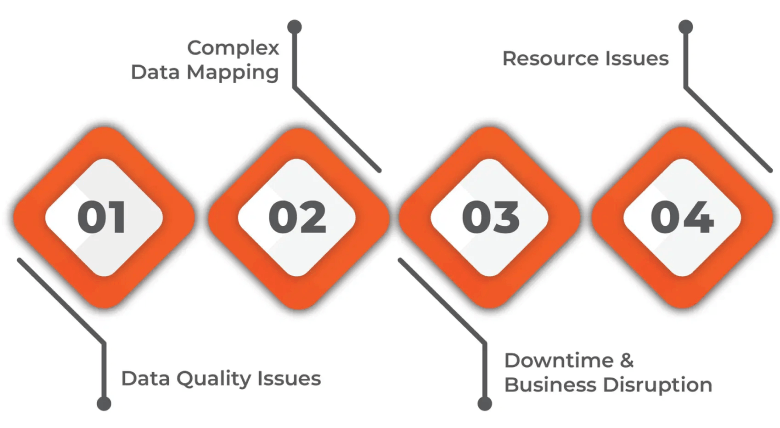
What Are the Most Common SAP Data Migration Challenges and How Do You Solve Them?
Duplicate vendor and customer master records
Duplicate records are one of the most common obstacles in data migration in SAP. Vendor identity is harder to deduplicate than customer identity because naming conventions, partial tax IDs, and address formats vary widely across legacy systems.
Probabilistic matching, applied before extraction, not after load is necessary to surface the full duplicate population and eliminate the downstream risk of duplicate payments.
Chart of accounts harmonization
Organizations that have grown through acquisition often carry multiple charts of accounts mapped inconsistently to a parent structure. Mapping every legacy account code to its SAP target, while preserving correct accounting treatment for every transaction type, is a finance decision as much as a technical one and it needs finance stakeholders engaged early, not consulted after the mapping is built.
Scope creep on historical data
Deciding what to archive versus migrate is consistently underestimated. A clear retention and archiving policy, defined during the assessment phase, prevents historical data from migrating in full simply because no one made an explicit decision to leave it behind.
Lack of business user accessibility
Standard SAP migration tools support technical validation but rarely give business users a odirect interface to correct flagged records. Building a lightweight review and correction workflow for business stakeholders, rather than relying on spreadsheets with no version control, keeps remediation moving without bottlenecking on the technical team. This is a common ask for our web design and development team, who build these internal review tools alongside the migration itself.
Underestimated cross-system dependencies
Data objects rarely migrate in isolation; an order can’t load without its referenced material and customer master already being in place. Sequencing dependencies correctly, and testing them together rather than object by object, prevents load failures late in the process.

What Are the Best SAP Data Migration Tools in 2026?
The right data migration techniques in SAP are only as effective as the tools executing them. Tool selection should follow strategy: a brownfield conversion with mostly stable data has very different tooling needs than a greenfield rebuild migrating from multiple non-SAP legacy systems. Here is the current tool landscape:
SAP S/4HANA Migration Cockpit
SAP’s primary tool for object-based data migration into S/4HANA, offering predefined templates and built-in validation for standard data objects.
SAP Data Services
An ETL (extract, transform, load) platform that integrates with SAP environments and supports data validation, reconciliation, and automation across large data volumes.
LSMW (Legacy System Migration Workbench)
A long-standing SAP tool for batch data loads, still used for select scenarios where Migration Cockpit coverage is limited.
SAP ADMM (Advanced Data Migration and Management)
Used in larger transformation programs for data migration paired with ongoing master data management.
Third-party ETL and data quality platforms
Specialized tools for data profiling, deduplication, and cross-field validation that fill the gaps standard SAP tools don’t cover, particularly for complex master data cleansing before load.
Tool selection should follow strategy, not the other way around: a brownfield conversion with mostly stable data has very different tooling needs than a greenfield rebuild migrating from multiple non-SAP legacy systems.
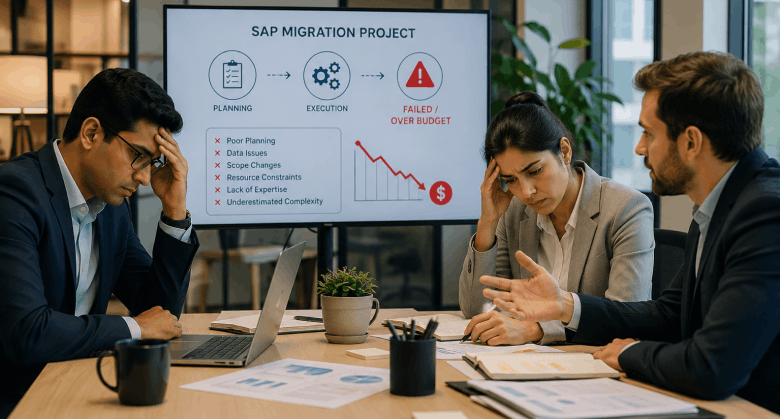
Why Do So Many SAP Migration Projects Fail or Run Over Budget?
Industry research has found that a striking share of migration projects fail or exceed budget and the root cause is almost never infrastructure, licensing, or custom code complexity.
It’s data: vendor master records with duplicates nobody caught, cost centers that existed in the old system but were never mapped to the new chart of accounts, and historical data that migrated in full because no one made the call to archive it.
The pattern is consistent across industries and organization sizes. SAP data migration projects fail on planning discipline and stakeholder alignment, not on technology choice.

How Does SPV Consulting Approach SAP Data Migration?
SPV Consulting’s migration methodology is built around SNP-certified consultants working directly with different industry clients on data-quality-first migrations, treating the assessment and cleansing phases as the foundation the rest of the project depends on, rather than a checkbox before the “real” technical work begins.
The governance-first approach means every data migration in SAP engagement includes defined reconciliation cadences that extend past go-live, structured business-user validation workflows, and a post-migration governance handoff that doesn’t dissolve the moment the project team disbands.
Founder Ravi Nemani’s background in enterprise SAP delivery shapes a governance-first approach: every migration includes a defined reconciliation and validation cadence that extends past go-live, so data quality doesn’t quietly degrade in the first 90 days when most projects stop paying attention.
min read
TOPICS
- What Is SAP Data Migration?
- What Triggers an SAP Data Migration? Six Common Scenarios?
- What Are the Types of SAP Data Migration?
- Why Is SAP Data Migration So Urgent in 2026?
- Which SAP Migration Strategy Is Right for You?
- What Are the Best Practices for SAP Data Migration?
- SAP Data Migration Challenges and How Do You Solve Them?
- What Are the Best SAP Data Migration Tools in 2026?
- Why Do So Many SAP Migration Projects Fail or Run Over Budget?
- How Does SPV Consulting Approach SAP Data Migration?
Frequently Asked Questions
What is the difference between SAP data migration and SAP data conversion?
Data migration moves data between two different systems, such as from ECC to S/4HANA. Data conversion changes the format or structure of data without necessarily changing the underlying system.
How long does an SAP data migration take?
Timelines vary by approach and data complexity, but most SAP migrations run from several months to a few years, with brownfield conversions typically faster than full greenfield reimplementations.
How should security be handled during SAP data migration?
Security during migration requires data classification, scoped access controls (with SoD rules applied to migration user roles), encryption in flight and at rest, audit logging of all data movement, and – critically – revocation of elevated technical user permissions immediately after go-live.
What is Selective Data Transition in SAP?
Selective Data Transition is a hybrid migration approach that allows organizations to modernize their SAP environment and adopt new S/4HANA capabilities while retaining the specific customizations and historical data they need, balancing the benefits of greenfield and brownfield approaches.
What tools does SAP provide for data migration?
SAP’s core tools include the S/4HANA Migration Cockpit, SAP Data Services, LSMW, and SAP ADMM, each suited to different migration scenarios and data volumes.
Why do SAP data migration projects fail?
The most common cause is data quality, not technology: duplicate records, unmapped cost centers or accounts, and undefined archiving decisions that surface late in the project and derail cutover.
What happens when SAP ECC support ends?
Mainstream maintenance for SAP Business Suite 7, including ECC 6.0, ends in 2027, with optional extended maintenance available through 2030. After mainstream support ends, organizations face increased security, compliance, and operational risk if they haven’t migrated.
How often should organizations perform SAP data migrations or upgrades?
Major migrations are triggered by strategic events – ECC end of support, M&A, cloud strategy shifts – rather than a fixed schedule. Smaller data quality improvements and enhancement packs should be ongoing. Most organizations revisit their full SAP landscape every few years in response to business or technology changes.